Exemplary workflow of CIDER#
Setup#
The first step when using CIDER is to import CIDER and define a suitable name for calling.
[1]:
from CIDER import ChemicalDatasetComparator
cider = ChemicalDatasetComparator()
Class variables#
[2]:
cider.import_keyname = "SDMolSupplier_Object" # cider.import_as_data_dict:

cider.dataset_length_keyname = "number_of_molecules" # cider.get_number_of_molecules

cider.database_id_keyname = "coconut_id" # cider.get_database_id

cider.identifier_keyname = "identifier_list" # cider.get_identifier_list_key

cider.duplicates_keyname = "number_of_duplicates" # cider.get_duplicate_key
cider.duplicates_id_keyname = "duplicates" # cider.get_duplicate_key

cider.shared_mols_keyname = "number_of_shared_molecules" # cider.get_shared_molecules_key
cider.shared_mols_id_keyname = "shared_molecules" # cider.get_shared_molecules_key

cider.lipinski_list_keyname = "number_of_broken_Lipinski_Rules" # cider.get_lipinski_key
cider.lipinski_summary_keyname = "Lipinski_Rule_of_5_summary" # cider.get_lipinski_key

cider.scaffold_list_keyname = "scaffold_list" # cider.draw_most_frequent_scaffolds
cider.scaffold_summary_keyname = "scaffold_summary" # cider.draw_most_frequent_scaffolds
Data import and inspection#
[3]:
testdict = cider.import_as_data_dict('data')
2022-11-15 11:30:37,282 [INFO] CIDER: No faulty molecules found in set_chlorbenzene-5.sdf
2022-11-15 11:30:37,316 [INFO] CIDER: No faulty molecules found in set_chlorbenzene.sdf
2022-11-15 11:30:37,349 [INFO] CIDER: No faulty molecules found in set_phenole.sdf
2022-11-15 11:30:37,349 [INFO] CIDER: Created dictionary with keys: ['set_chlorbenzene-5.sdf', 'set_chlorbenzene.sdf', 'set_phenole.sdf', 'figures']
2022-11-15 11:30:37,357 [WARNING] CIDER: Already existing output folder with files! Old data will be overwritten!
[4]:
testdict
[4]:
{'set_chlorbenzene-5.sdf': {'SDMolSupplier_Object': <rdkit.Chem.rdmolfiles.SDMolSupplier at 0x2458e51bbf0>},
 'set_chlorbenzene.sdf': {'SDMolSupplier_Object': <rdkit.Chem.rdmolfiles.SDMolSupplier at 0x245b6027ec0>},
 'set_phenole.sdf': {'SDMolSupplier_Object': <rdkit.Chem.rdmolfiles.SDMolSupplier at 0x245b6027e70>},
 'figures': {}}
Additionally to the SDFile keys there is the key ‘figures’ in the main dictionary. In this sub-dictionary all plots and images that are created will be stored.
Overview dataset size#
[5]:
cider.get_number_of_molecules(testdict)
2022-11-15 11:30:37,583 [INFO] CIDER: Number of molecules in set_chlorbenzene-5.sdf: 50
2022-11-15 11:30:37,586 [INFO] CIDER: Number of molecules in set_chlorbenzene.sdf: 100
2022-11-15 11:30:37,586 [INFO] CIDER: Number of molecules in set_phenole.sdf: 100
2022-11-15 11:30:37,594 [INFO] CIDER: Updated dictionary with 'number_of_molecules'
Now all the sub-dictionaries are updated with the key ‘number_of_molecules’ and the number of molecules can be accessed by this new key.
[6]:
first_subdict = list(testdict.keys())[0]
print(testdict[first_subdict].keys())
print('Number of molecules in the first set: ' + str(testdict[first_subdict]['number_of_molecules']))
dict_keys(['SDMolSupplier_Object', 'number_of_molecules'])
Number of molecules in the first set: 50
Overview molecules (visualization of molecules)#
[7]:
cider.draw_molecules(testdict, number_of_mols = 20, mols_per_row = 10)
2022-11-15 11:30:39,124 [INFO] CIDER: Updated dictionary with 'mol_grid'
[7]:

Get Database ID#
When working with SDFiles exported from a database, it could be helpful to add the database ID for every molecule to the dictionary. For doing so, it is necessary to know how the ID is named in the SDFiles.
[8]:
cider.get_database_id(testdict, 'coconut_id')
2022-11-15 11:30:40,274 [INFO] CIDER: Updated dictionary with 'coconut_id'
[9]:
print(testdict[first_subdict].keys())
print('First COCONUT IDs for first set: ' + str(testdict[first_subdict]['coconut_id'][:5]))
dict_keys(['SDMolSupplier_Object', 'number_of_molecules', 'coconut_id'])
First COCONUT IDs for first set: ['CNP0009107', 'CNP0341270', 'CNP0206286', 'CNP0284887', 'CNP0080171']
Get Chemical Identifier#
[10]:
cider.get_identifier_list_key(testdict, 'smiles')
2022-11-15 11:30:40,632 [INFO] CIDER: Updated dictionary with 'identifier_list'
As before all sub-dictionaries are now containing the new key ‘identifier_list’ and those lists can be accessed.
[11]:
print(testdict[first_subdict].keys())
print('First SMILES strings for first set: ' + str(testdict[first_subdict]['identifier_list'][:5]))
dict_keys(['SDMolSupplier_Object', 'number_of_molecules', 'coconut_id', 'identifier_list'])
First SMILES strings for first set: ['Clc1ccccc1', 'Clc1ccc(Cl)cc1', 'Clc1ccc(Cl)c(Cl)c1', 'Clc1ccccc1Cl', 'Clc1cccc(Cl)c1']
Testing for duplicates#
[12]:
cider.get_duplicate_key(testdict)
2022-11-15 11:30:40,827 [INFO] CIDER: Number of duplicates in set_chlorbenzene-5.sdf: 0
2022-11-15 11:30:40,832 [INFO] CIDER: Number of duplicates in set_chlorbenzene.sdf: 0
2022-11-15 11:30:40,832 [INFO] CIDER: Number of duplicates in set_phenole.sdf: 2
2022-11-15 11:30:40,832 [INFO] CIDER: Updated dictionary with 'number_of_duplicates'
[13]:
cider.get_duplicate_key(testdict, identifier=True)
2022-11-15 11:30:40,949 [INFO] CIDER: Number of duplicates in set_chlorbenzene-5.sdf: 0, duplicate identifier(s): set()
2022-11-15 11:30:40,949 [INFO] CIDER: Number of duplicates in set_chlorbenzene.sdf: 0, duplicate identifier(s): set()
2022-11-15 11:30:40,957 [INFO] CIDER: Number of duplicates in set_phenole.sdf: 2, duplicate identifier(s): {'O=Cc1ccc(O)cc1', 'O=Cc1ccccc1O'}
2022-11-15 11:30:40,957 [INFO] CIDER: Updated dictionary with 'number_of_duplicates' and 'duplicates'
In the established way the new keys in the sub-dictionaries can be accessed.
[14]:
print('There are ' + str(testdict[first_subdict]['number_of_duplicates']) + ' duplicates in the first set.')
print('SMILES strings for the duplicates: ' + str(testdict[first_subdict]['duplicates']) )
There are 0 duplicates in the first set.
SMILES strings for the duplicates: set()
Comparison of molecules and visualization#
[15]:
if len(testdict.keys()) <= 2:  # The number of keys is 2 if there is only one dataset, because there is the 'figure' dict with all figures and images.
    print("Shared molecules should only be calculated when there are more than one dataset!")
else:
    cider.get_shared_molecules_key(testdict)
2022-11-15 11:30:41,195 [INFO] CIDER: Number of molecules found in all datasets: 10, identifier(s): {'Oc1ccc(O)c(Cl)c1', 'Oc1ccccc1Cl', 'O=[N+]([O-])c1ccc(O)c(Cl)c1', 'Oc1ccc(Cl)cc1', 'Oc1ccc(Cl)cc1Cl', 'Oc1cc(Cl)ccc1Cl', 'O=[N+]([O-])c1cc(Cl)ccc1O', 'Oc1cccc(Cl)c1Cl', 'Oc1cccc(Cl)c1', 'Oc1ccc(Cl)c(Cl)c1'}
2022-11-15 11:30:41,199 [INFO] CIDER: Updated dictionary with 'number_of_shared_molecules' and 'shared_molecules'
[16]:
if len(testdict.keys()) == 4 or len(testdict.keys()) == 3:
    intersection = cider.visualize_intersection(testdict)
else:
    intersection = 'Does not exist!'
    print('This cell will fail if there are only one or more than three datasets for comparison!')

intersection
2022-11-15 11:30:41,599 [INFO] CIDER: Updated dictionary with 'intersection'
[16]:

Get Descriptor#
[17]:
from rdkit.Chem import Descriptors
from rdkit.Chem import rdMolDescriptors
[18]:
cider.get_descriptor_list_key(testdict, Descriptors.MolWt, 'Molecular Weight')
2022-11-15 11:30:42,006 [INFO] CIDER: Updated dictionary with 'Molecular Weight'
[19]:
cider.get_descriptor_list_key(testdict, rdMolDescriptors.CalcMolFormula, 'Molecular Formula')
2022-11-15 11:30:42,133 [INFO] CIDER: Updated dictionary with 'Molecular Formula'
[20]:
cider.get_descriptor_list_key(testdict, Descriptors.NumHDonors, 'Number of H-Donors')
2022-11-15 11:30:42,306 [INFO] CIDER: Updated dictionary with 'Number of H-Donors'
[21]:
cider.get_descriptor_list_key(testdict, Descriptors.RingCount, 'Number of Rings')
2022-11-15 11:30:42,534 [INFO] CIDER: Updated dictionary with 'Number of Rings'
In the cell below there are some more examples for descriptors that could be calculated.
[22]:
# cider.get_descriptor_list_key(testdict, Descriptors.NumHDonors, 'Number of H-Donors')
# cider.get_descriptor_list_key(testdict, Descriptors.RingCount, 'Number of Rings')
# cider.get_descriptor_list_key(testdict, Descriptors.NumHAcceptors, 'Number of H-Acceptors')
# cider.get_descriptor_list_key(testdict, Descriptors.Chi1, 'Chi Connectivity Indices')
# cider.get_descriptor_list_key(testdict, Descriptors.Kappa1, 'Kappa Shape Indices')
Taking a look at the sub-dictionary keys the calculated descriptor values can be found there as new keys.
[23]:
print(testdict[first_subdict].keys())
dict_keys(['SDMolSupplier_Object', 'number_of_molecules', 'coconut_id', 'identifier_list', 'number_of_duplicates', 'duplicates', 'number_of_shared_molecules', 'shared_molecules', 'Molecular Weight', 'Molecular Formula', 'Number of H-Donors', 'Number of Rings'])
Get descriptor value with database ID#
Using the database ID from a molecule it is possible to search in the dataset for a descriptor value for this molecule. Not only the descriptor value will be returned but also the sub-dictionary where the molecule was found.
[24]:
def get_value_from_id(
    all_dicts: dict, wanted_id: str, descriptor_list_keyname: str
):
    """
    This function returns a descriptor value for a specific molecule referred to by its database ID and
    the dataset where the molecule has been found.

    Args:
        all_dicts (dict): dictionary of dictionaries with database_id_keyname and descriptor_list_keyname
        wanted_id (str): Database ID for the molecule of interest.
        descriptor_list_keyname (str): Descriptor value of interest.

    Returns:
        Print: Descriptor value and dataset where the molecule is found.

    """
    for single_dict in all_dicts:
        if single_dict == cider.figure_dict_keyname:
                continue
        if wanted_id in all_dicts[single_dict][cider.database_id_keyname]:
            print("Molecule found in " + str(single_dict))
            index = all_dicts[single_dict][cider.database_id_keyname].index(
                wanted_id
            )
            descriptor_value = all_dicts[single_dict][descriptor_list_keyname][
                index
            ]
            print(
                str(descriptor_list_keyname)
                + " value for ID "
                + str(wanted_id)
                + ": "
                + str(descriptor_value)
            )
        else:
            print("Molecule not found in " + str(single_dict))
    return
[25]:
get_value_from_id(testdict, 'CNP0291002', 'Molecular Weight')
Molecule found in set_chlorbenzene-5.sdf
Molecular Weight value for ID CNP0291002: 173.55499999999998
Molecule found in set_chlorbenzene.sdf
Molecular Weight value for ID CNP0291002: 173.55499999999998
Molecule found in set_phenole.sdf
Molecular Weight value for ID CNP0291002: 173.55499999999998
Descriptor binning and visualization#
[26]:
cider.descriptor_counts_and_plot(testdict, 'Molecular Weight', width_of_bins = 10)
2022-11-15 11:30:43,156 [INFO] CIDER: Updated the dictionary with 'binned_Molecular Weight'
2022-11-15 11:30:43,881 [INFO] CIDER: Updated dictionary with 'distribution_of_Molecular Weight'
[26]:

The number of rings is a discrete descriptor and a given interval size will be ignored. The plotting values will not be exported due to the parameter ‘save_dataframe=False’.
[27]:
cider.descriptor_counts_and_plot(testdict, 'Number of Rings', width_of_bins = 10, save_dataframe=False)
2022-11-15 11:30:44,360 [INFO] CIDER: Updated the dictionary with 'binned_Number of Rings'
2022-11-15 11:30:44,732 [INFO] CIDER: Updated dictionary with 'distribution_of_Number of Rings'
[27]:

Lipinski Rules of 5 with visualization#
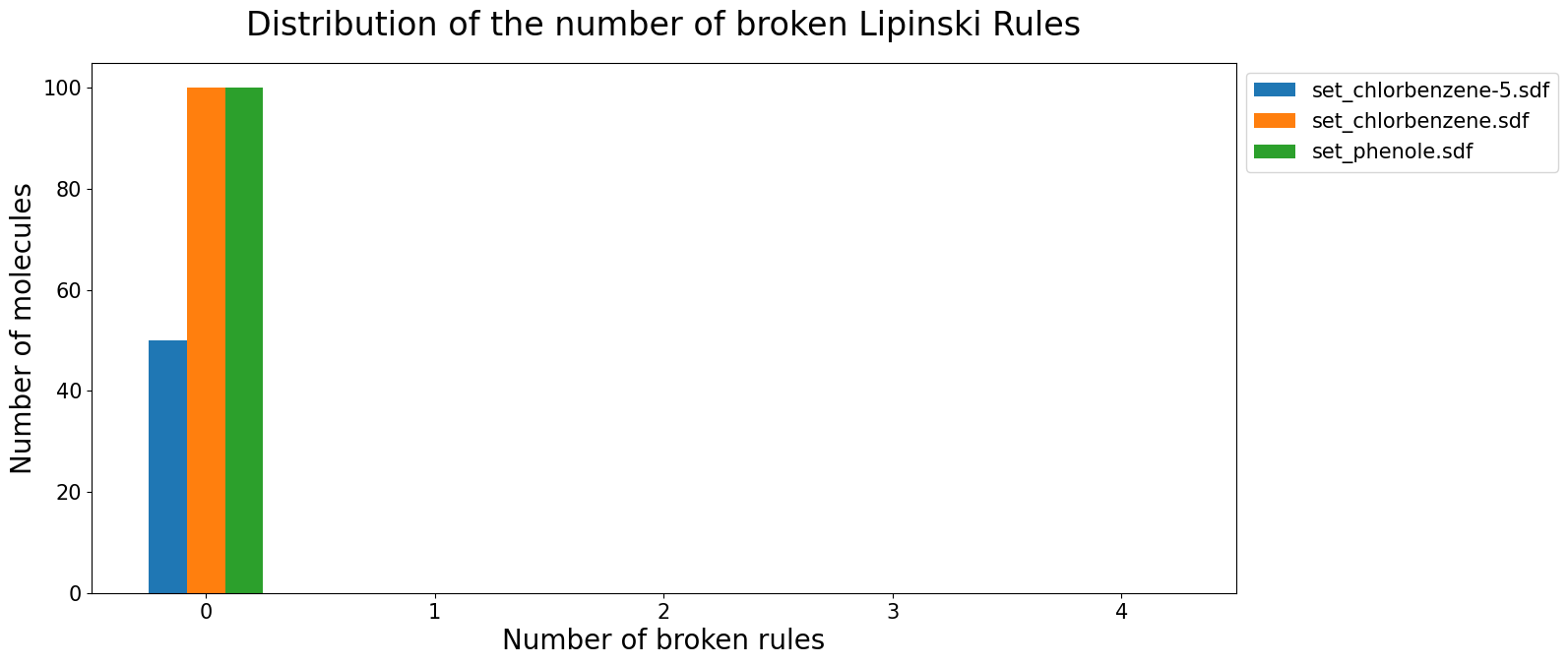
The Lipinski Rules of 5 include more than one descriptor. CIDER can check all the single descriptors of the Lipinski Rules and get the number of broken rules for every molecule. There will also be a summary for every dataset, how the molecules are distributed.
[28]:
cider.get_lipinski_key(testdict)
2022-11-15 11:30:45,299 [INFO] CIDER: Updated dictionary with 'number_of_broken_Lipinski_Rules' and 'Lipinski_Rule_of_5_summary'
[29]:
cider.lipinski_plot(testdict)
2022-11-15 11:30:45,824 [INFO] CIDER: Updated dictionary with 'lipinski_plot'
[29]:
Scaffold analysis#
[30]:
cider.draw_most_frequent_scaffolds(testdict)
2022-11-15 11:30:46,314 [INFO] CIDER: Updated dictionary with 'scaffold_list' and 'scaffold_summary'
2022-11-15 11:30:47,007 [INFO] CIDER: Updated dictionary with 'scaffold_grid'
[30]:

[31]:
cider.draw_most_frequent_scaffolds(testdict, framework=True, normalize=False)
2022-11-15 11:30:47,916 [INFO] CIDER: Updated dictionary with 'scaffold_list' and 'scaffold_summary'
2022-11-15 11:30:48,632 [INFO] CIDER: Updated dictionary with 'scaffold_grid_1'
[31]:

Similar to the cider.draw_molecules method the number of shown scaffolds (frameworks, graph framework) can be chosen as well as the number of images per row. When there are less scaffolds (frameworks, graph frameworks) in the dataset than the chosen number, the highest possible number of scaffolds (frameworks, graph frameworks) will be used.
[32]:
cider.draw_most_frequent_scaffolds(testdict, graph_framework=True, number_of_structures=8, structures_per_row=4)
2022-11-15 11:30:49,491 [INFO] CIDER: Updated dictionary with 'scaffold_list' and 'scaffold_summary'
2022-11-15 11:30:50,308 [INFO] CIDER: Updated dictionary with 'scaffold_grid_2'
[32]:

Chemical Space Visualization#
[33]:
cider.chemical_space_visualization(testdict)
[33]:
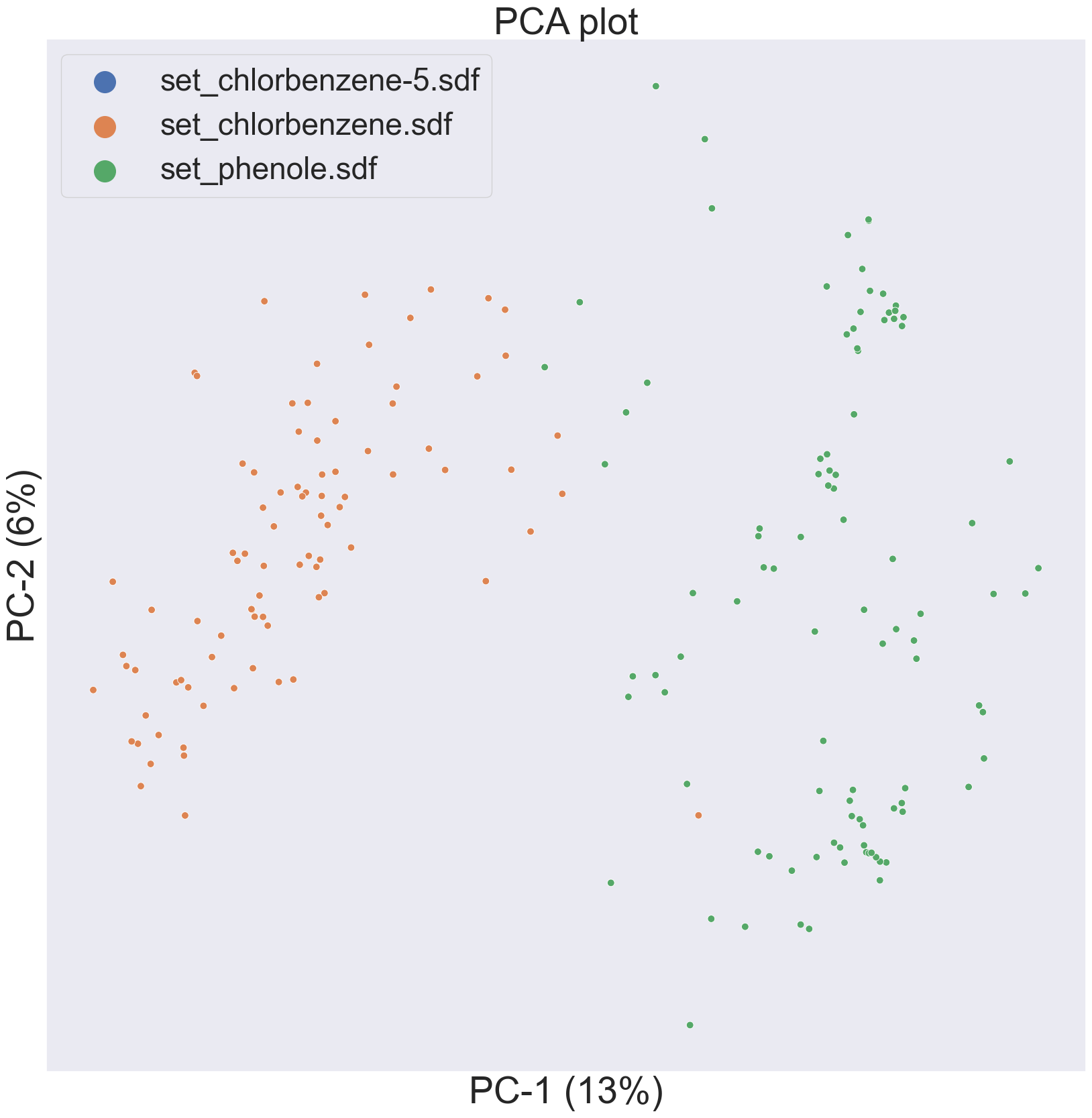
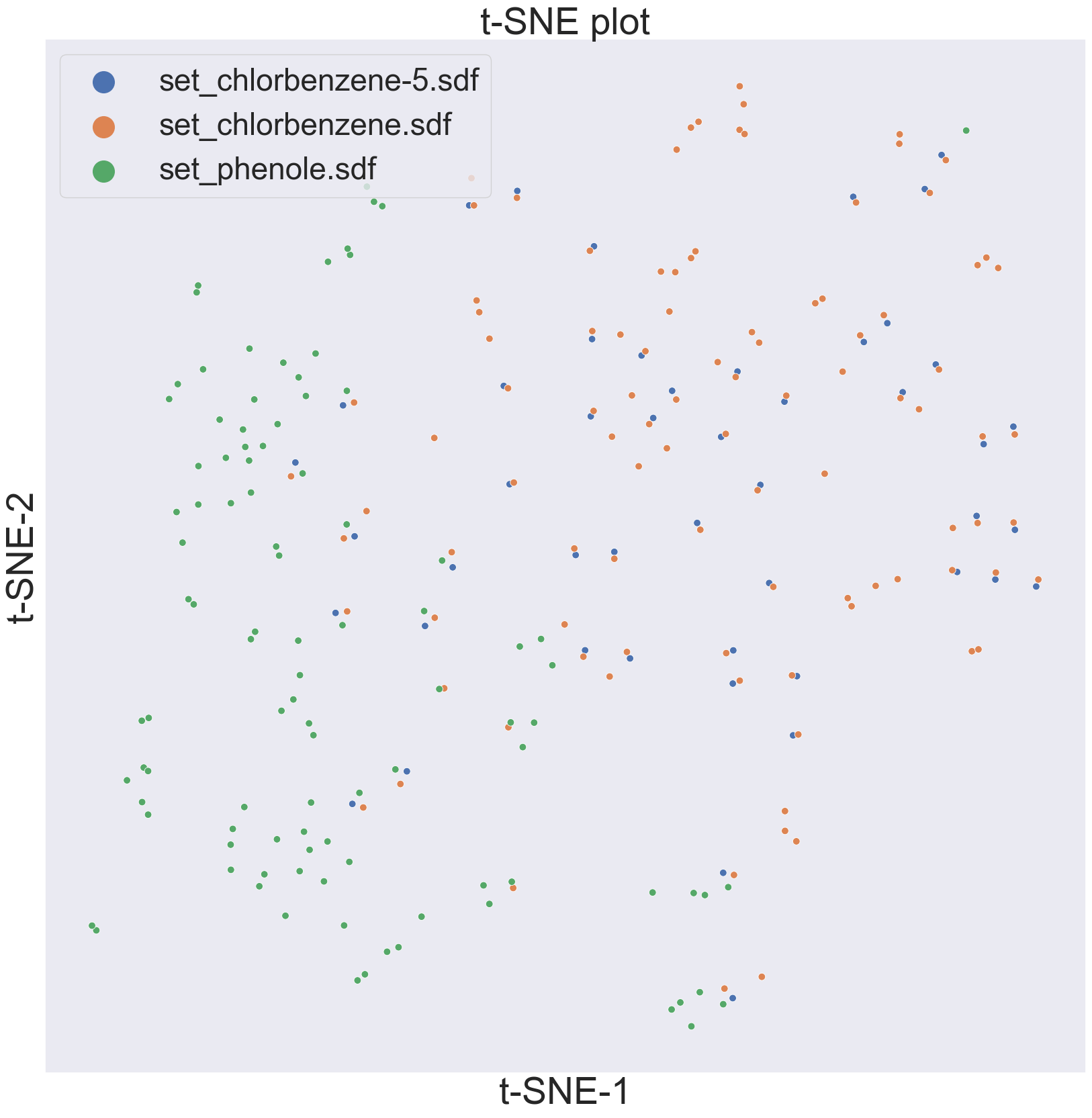
The interactive plot will not be displayed in line but is opened in a new window. There it can be saved. Please note that to dots from the chlorbenzene-5 set (blue dots in the interactive) are superimposed with the dots from the chlorbenzene set (green dots in the interactive plot) as both of the sets contain the same molecules. Therefore the blue dots are not visible. In the interactive plot this can be noted when pointing on the dots but for the ‘normal’ plots this should be kept in mind. Changing the dimension reductions shows the difference between the different methods.
[34]:
cider.chemical_space_visualization(testdict, dimension_reduction = 'pca', interactive = False, fp_bits = 1024, fp_radius = 2)
2022-11-15 11:30:56,474 [INFO] CIDER: Updated dictionary with 'chemical_space'
[34]:
[35]:
cider.chemical_space_visualization(testdict, dimension_reduction = 'umap', interactive = False, fp_bits = 1024, fp_radius = 2)
2022-11-15 11:31:23,001 [INFO] CIDER: Updated dictionary with 'chemical_space_1'
[35]:

[36]:
cider.chemical_space_visualization(testdict, dimension_reduction = 'tsne', interactive = False, fp_bits = 1024, fp_radius = 2)
c:\Users\hannah\.conda\envs\CDC_neu\lib\site-packages\sklearn\manifold\_t_sne.py:795: FutureWarning: The default initialization in TSNE will change from 'random' to 'pca' in 1.2.
  warnings.warn(
c:\Users\hannah\.conda\envs\CDC_neu\lib\site-packages\sklearn\manifold\_t_sne.py:805: FutureWarning: The default learning rate in TSNE will change from 200.0 to 'auto' in 1.2.
  warnings.warn(
2022-11-15 11:31:27,051 [INFO] CIDER: Updated dictionary with 'chemical_space_2'
[36]:
Export#
All the calculated descriptor values can be exported into csv files for the respective dataset.
[37]:
cider.export_single_dict_values(testdict)
2022-11-15 11:31:27,675 [INFO] CIDER: set_chlorbenzene-5.sdf: 8 exported descriptor values
2022-11-15 11:31:27,684 [INFO] CIDER: set_chlorbenzene.sdf: 8 exported descriptor values
2022-11-15 11:31:27,688 [INFO] CIDER: set_phenole.sdf: 8 exported descriptor values
All the created images can be saved into one pdf.
[38]:
cider.export_all_figures_pdf(testdict)
2022-11-15 11:31:31,201 [INFO] CIDER: All plots exported to 'all_figures.pdf'